F-Droid
What is F-Droid
F-Droid is an app store dedicated to free and open-source Android applications (FOSS).
Unlike Google Play or pre-installed app stores on phones, every app in F-Droid meets the following criteria:
Must be open source: Licensed under GPL, Apache, MIT, and other open-source licenses
No ads: Ad SDKs are prohibited
No tracking: Built-in user tracking code is not allowed
No payment restrictions: All features are completely free
In short, apps on F-Droid are clean, transparent, and privacy-respecting. You don’t need to register an account to download apps, and F-Droid doesn’t track what you install.
How to Install F-Droid
Google Play comes pre-installed on phones, but you need to install F-Droid yourself.
Method 1: Download APK from Official Website (Recommended)
Open the official website with your mobile browser: https://f-droid.org
Click the green “Download F-Droid” button to download the APK
After the download is complete, click the APK file to start installation
When the system prompts “Allow installation of unknown sources”, follow the prompts to enable permissions
Click “Install” to complete the installation
⚠️ Note: Do not download F-Droid from domestic third-party app markets, as the version may be outdated or even have additional content implanted.
Method 2: Download from Tsinghua Mirror (When the official website is inaccessible)
If you cannot access the official website, you can download the latest APK directly from the Tsinghua mirror:
https://mirrors.tuna.tsinghua.edu.cn/fdroid/archive/org.fdroid.fdroid_1019052.apk
First Launch and Configuring Domestic Mirror (Important!)
First Time Opening
After installation, open F-Droid, and it will automatically try to refresh the app list. If you see it spinning or showing errors - don’t panic, this is because the default repository is overseas and the domestic network cannot connect. The solution is to configure a domestic mirror. You can refer to: F-Droid Tsinghua University Mirror Usage
Configure Tsinghua Mirror
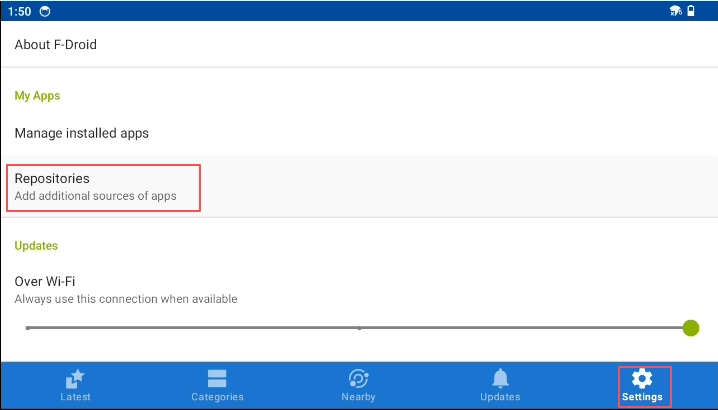
Step 1: Go to Settings → Repositories
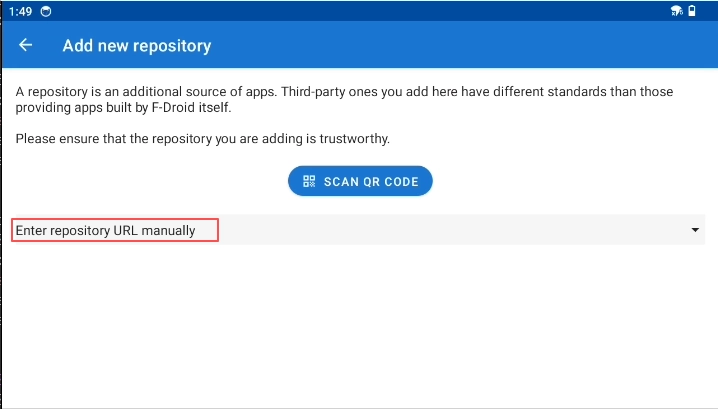
Step 2: Click the “+” in the bottom right corner → Select “Enter repository URL manually”
Step 3: Paste the following address:
http://mirrors4.tuna.tsinghua.edu.cn/fdroid/repo/?fingerprint=43238D512C1E5EB2D6569F4A3AFBF5523418B82E0A3ED1552770ABB9A9C9CCAB
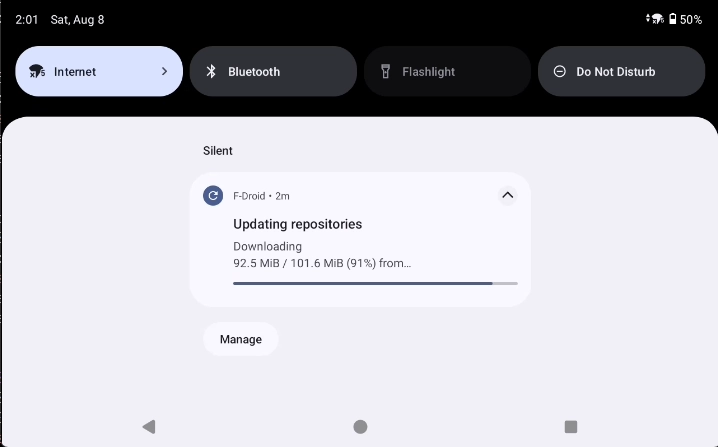
Step 4: Click “ADD”, then click “ADD AS NEW MIRROR” again to confirm after completion. You need to wait for a while after adding。
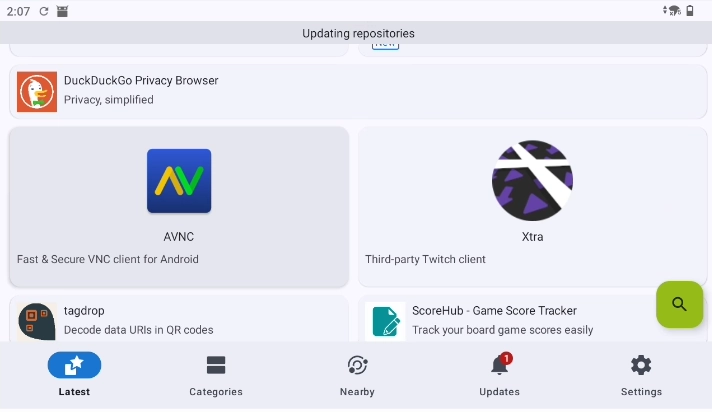
Step 5: Go back to the home page, manually pull down to refresh, and wait for the app list to load
How to Use F-Droid
Browse and Search Apps
Home page: Shows the latest updated apps by default
Browse by category: Click the “Categories” tab at the bottom to search by categories such as “Tools”, “Network”, “Multimedia”, “Games”, etc.
Search: Click the search icon in the bottom right corner, enter the app name or keywords (supports Chinese)
Install Apps
Click to enter the app details page
Click the “Install” button in the top right corner
F-Droid will automatically download the APK and call the system installer
Follow the system prompts to confirm installation
After installation, the app will be marked as “Installed” in F-Droid, and the details page will show “Uninstall” and “Launch” buttons.
Update Apps
F-Droid will automatically check for updates of installed apps. When there are updates, you can see available updates in the “Updates” tab and click to upgrade.
Who is F-Droid For?
Frequently Asked Questions
Q: Why can’t the app list load?
A: The default repository is overseas, which is slow to access domestically. The solution is to configure the Tsinghua mirror as described in Chapter 3.
Q: Are all apps on F-Droid in English?
A: Most open-source apps are mainly in English, but many utility apps (file managers, players, input methods, etc.) support Chinese. You can check the list of supported languages on the app details page.
Q: Is F-Droid slower to update than the Play Store?
A: Yes. F-Droid needs to manually review source code changes and recompile from source, so updates will be slower than the Play Store.
Start Your Open Source Journey
Now you have mastered the basic usage of F-Droid. Go explore - you will discover an ad-free, tracking-free, completely free app world.
📱 Official Website: https://f-droid.org